
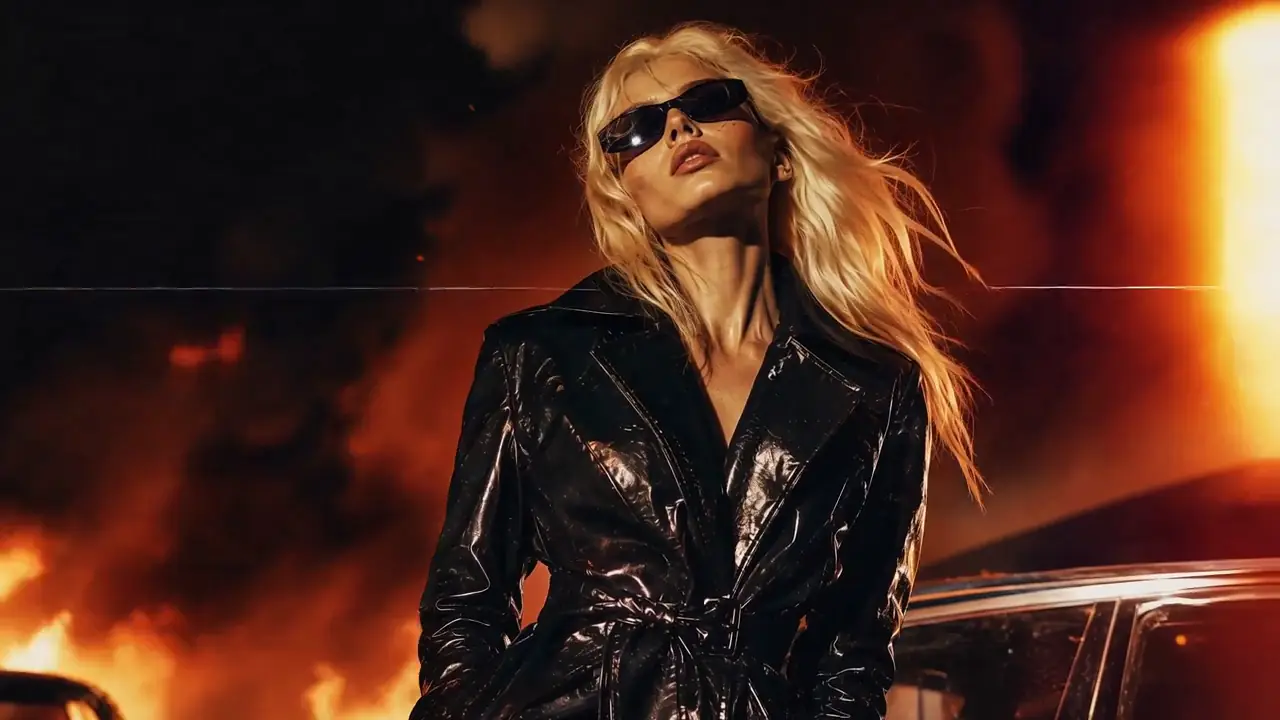
Can I Make a Product Video From One Photo?
Yes. Upload one clear product photo, then describe how the camera, lighting, background, and surrounding scene should move. The product image provides the visual starting point, while the prompt controls the motion and cinematic treatment of the generated video.
For product image-to-video generation, focus the prompt on motion rather than repeatedly describing details that are already visible in the source image.
AI-generated video can still change logos, labels, small text, colors, materials, or product geometry. Review the complete result before using it in ecommerce or advertising.
What Is an AI Product Video Generator?
An AI product video generator turns a product image or product concept into a short promotional video using generative AI. Instead of filming every shot, you can use an existing product photo as the visual starting point and describe the camera movement, lighting, environment, and motion you want.
MiniMax3 uses MiniMax H3 for supported product image-to-video workflows, including short cinematic product shots, ecommerce visuals, social content, and promotional clips.
Can I Turn One Product Photo Into a Video?
Yes. A single product photo can be used as the starting frame for an AI-generated product video. The image establishes the product and composition, while the prompt describes what should change over time—such as camera movement, lighting, reflections, background motion, or a product reveal.
For product videos, the prompt should focus more on motion than on repeatedly describing details that are already visible in the source image. The MiniMax H3 image to video workflow explains how the source image becomes the controlled first frame.
A good starting product image usually has:
- A clearly visible product
- Sharp edges and recognizable proportions
- Good lighting
- Enough space around the product
- Limited background clutter
- Large, readable branding if text accuracy matters
AI video generation can still introduce visual drift. Always review logos, labels, small text, colors, materials, and product proportions before publishing a generated clip as advertising.
AI Product Video Examples
Real single-image product examples are being added as they are generated and documented. The commercial examples below use existing verified H3 outputs and are labeled by their actual workflow.
Product Image → Prompt → Generated Video
This is the structure every real example below follows: the supplied product image, the original prompt, and the generated video. The product categories in this block are Prompt Ideas — no generation has been produced from them yet, so no video is shown and they are not published as examples or as structured video data. Each prompt is ready to run in the generator above.
Luxury Perfume Product Video
Prompt IdeaTurn a perfume product photo into a cinematic beauty commercial using a slow camera push-in, subtle orbit motion, reflections, mist, and warm rim lighting.
Jewelry Product Commercial
Prompt IdeaCreate a luxury jewelry video with macro camera movement, controlled highlights, and a clean premium background.
Electronics Product Video
Prompt IdeaAnimate an electronics product photo with smooth studio camera movement and premium technology-commercial lighting.
Beverage Product Video
Prompt IdeaCreate a beverage-style product shot with condensation, cinematic lighting, and a slow hero camera movement.
Fashion Product Video
Prompt IdeaTurn a fashion product image into a clean campaign-style video with subtle movement and editorial lighting.
Luxury Watch Product Video
Prompt IdeaGenerate a cinematic watch reveal using macro motion, rim lighting, reflections, and a controlled hero shot.
Real MiniMax H3 Commercial Examples
These are real MiniMax H3 outputs already documented on MiniMax3.org. Some use reference-to-video or multi-reference workflows rather than a single product image, so each example is labeled with its actual generation mode.
Vintage Binocular Brand Film
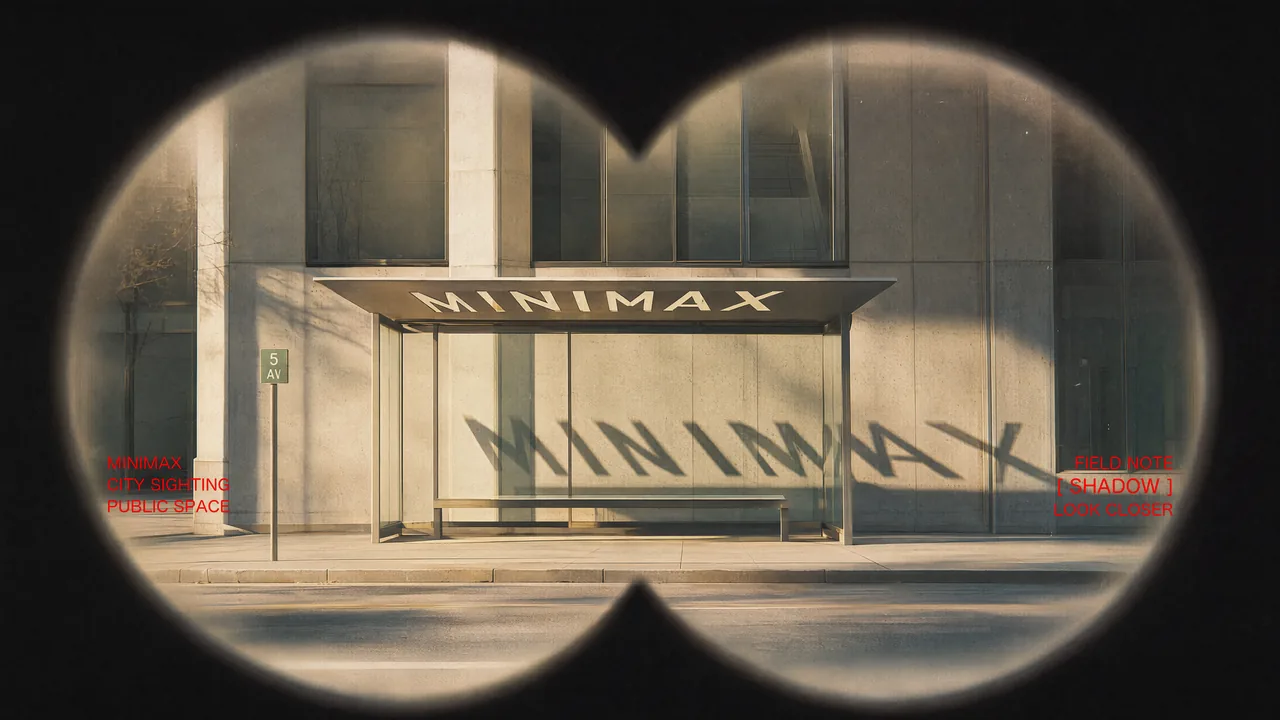
Input image 1 of 4 supplied to this generation
Prompt
Use Images 1–4 as sequential keyframes, seen through a vintage binocular viewfinder searching for the MINIMAX installation. Open out of focus with subtle handheld shake, then push in quickly and rack focus onto Image 1. Between keyframes, use fast binocular-scan transitions with whip movement, motion blur, optical smearing, and brief exposure flicker. Cut at peak blur, then settle and snap back into focus. Keep the twin circular lens mask absolutely fixed throughout: identical position, scale, feathered black vignette, and edge softness, with no warping or drift. Only the image inside the mask may move.

In Image 2, let the fabric move gently in the wind while the MINIMAX lettering follows the folds and remains legible. In Image 3, the subject should feel like a stylish passerby caught by chance, walking, turning, and swinging their arms naturally. In Image 4, the subject adjusts their glasses or lifts their chin slightly with a cool, effortless fashion-campaign attitude.

Red typography should resolve with the focus: begin slightly blurred and at low opacity, then fade into clarity over 0.3–0.5 seconds. A subtle vertical slide or slight tracking expansion is allowed. Fade it out before the next transition or let motion blur carry it away. No spins, bounces, or large fly-ins/outs.

Visual language: a voyeuristic, Wes Anderson-inspired 35 mm film look with fine grain, soft highlight halation, restrained color, and red typographic accents. Minimal, premium, lightly playful. Do not add people, vehicles, buildings, or logos. Preserve the core composition and the MINIMAX installation exactly.
Reference to Video · 1280×720
- Description
- A brand-film treatment that keeps a physical product and its packaging as the subject of a cinematic sequence.
- Intended Use
- Brand films, campaign hero content, and social storytelling.
Generation mode: Reference to Video. This clip was not produced from a single product image, so it is not labeled as product image to video.
Desert Fashion Campaign
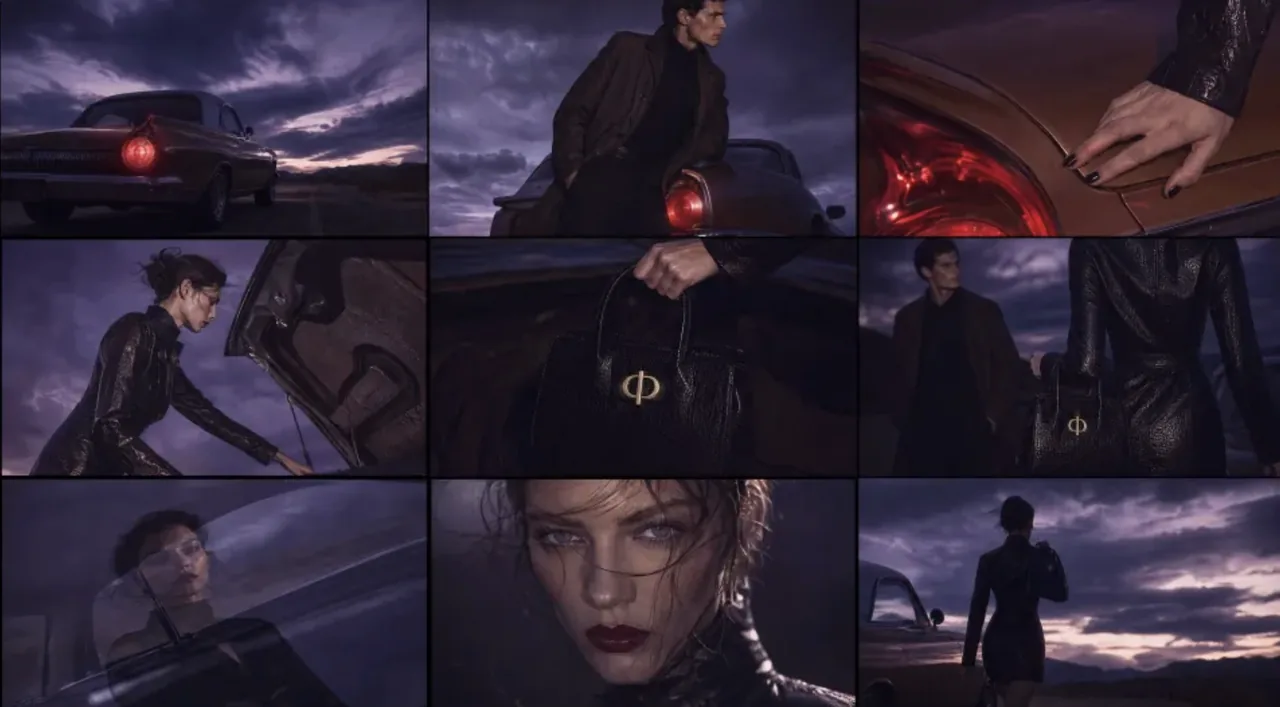
Input image 1 of 4 supplied to this generation
Prompt
Create a premium 16:9 landscape fashion film. Use Image 1 for the overall mood, location, and film texture; Image 2 for the talent; Image 3 for the bag; and Image 4 for the closing brand mark. This is a fashion campaign for the clothing and bag. The tone is elevated, cool, and restrained, but the edit should still feel lively and fashion-forward—not like a conventional narrative film or an e-commerce ad.

Keep the story simple: beside a vintage car on a desert highway, a woman walks to the rear of the car, opens the trunk, takes out a black bag, shares a quiet beat with the man standing nearby, then leaves carrying the bag. Integrate the clothing and bag naturally into the performance so they feel like part of the characters’ identity.
Reference to Video · 1280×720
- Description
- Fashion campaign footage for apparel and a bag, staged as a short narrative scene.
- Intended Use
- Fashion campaigns, lookbook content, and social storytelling.
Generation mode: Reference to Video. This clip was not produced from a single product image, so it is not labeled as product image to video.
Futuristic Eyewear Campaign
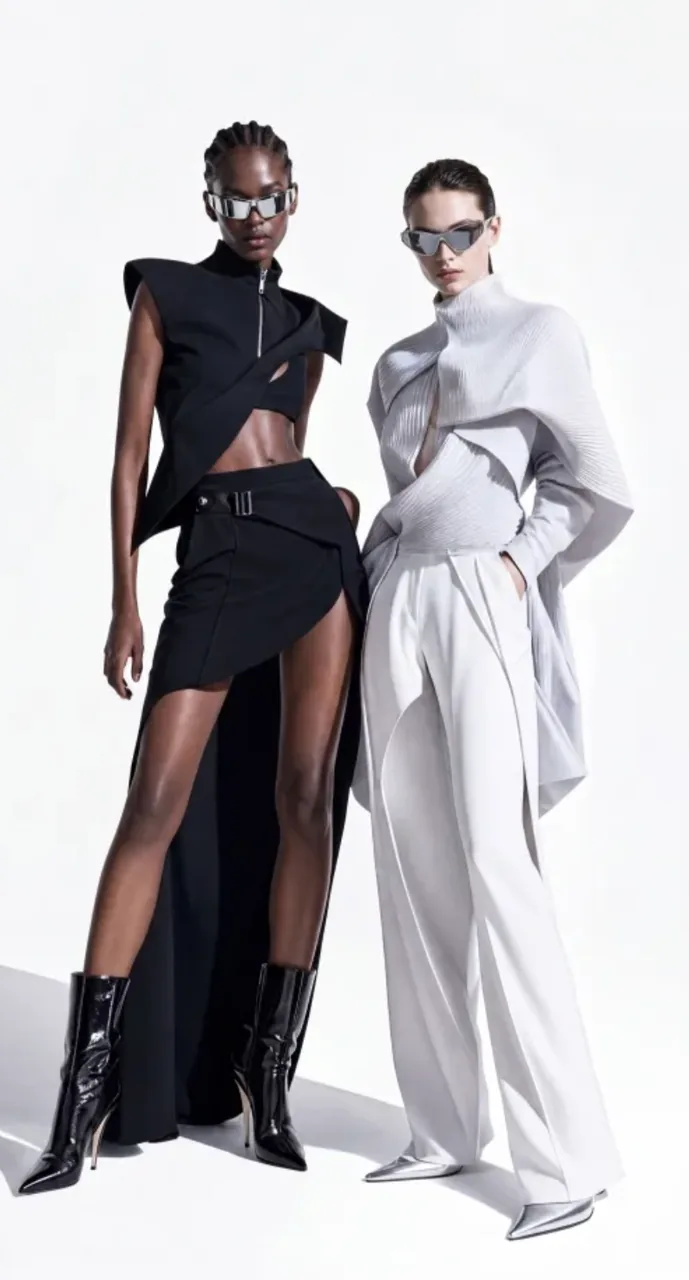
Input image 1 of 3 supplied to this generation
Prompt
Create a premium 9:16 fashion-eyewear commercial. Match the reference video’s shot rhythm, edit speed, white-cyclorama look, and severe fashion attitude. Use a seamless minimal white studio with clean, bold, avant-garde art direction worthy of a global luxury campaign.

Use Image 1 for the key visual: two full-body female models, one Black and one white, preserving their elevated wardrobe, body language, studio lighting, runway presence, and cool attitude. Use Image 2 for facial details. Both models wear futuristic luxury eyewear based on Image 3: wraparound curved lenses, a sharp cat-eye/goggle hybrid silhouette, mirrored reflections, streamlined temples, and the finish of a premium fashion accessory.
Reference to Video · 720×1280
- Description
- A wearable-accessory campaign built around eyewear as the hero product.
- Intended Use
- Accessory and eyewear campaigns, ecommerce product pages, and paid social creative.
Generation mode: Reference to Video. This clip was not produced from a single product image, so it is not labeled as product image to video.
Ergonomic Chair Product Film
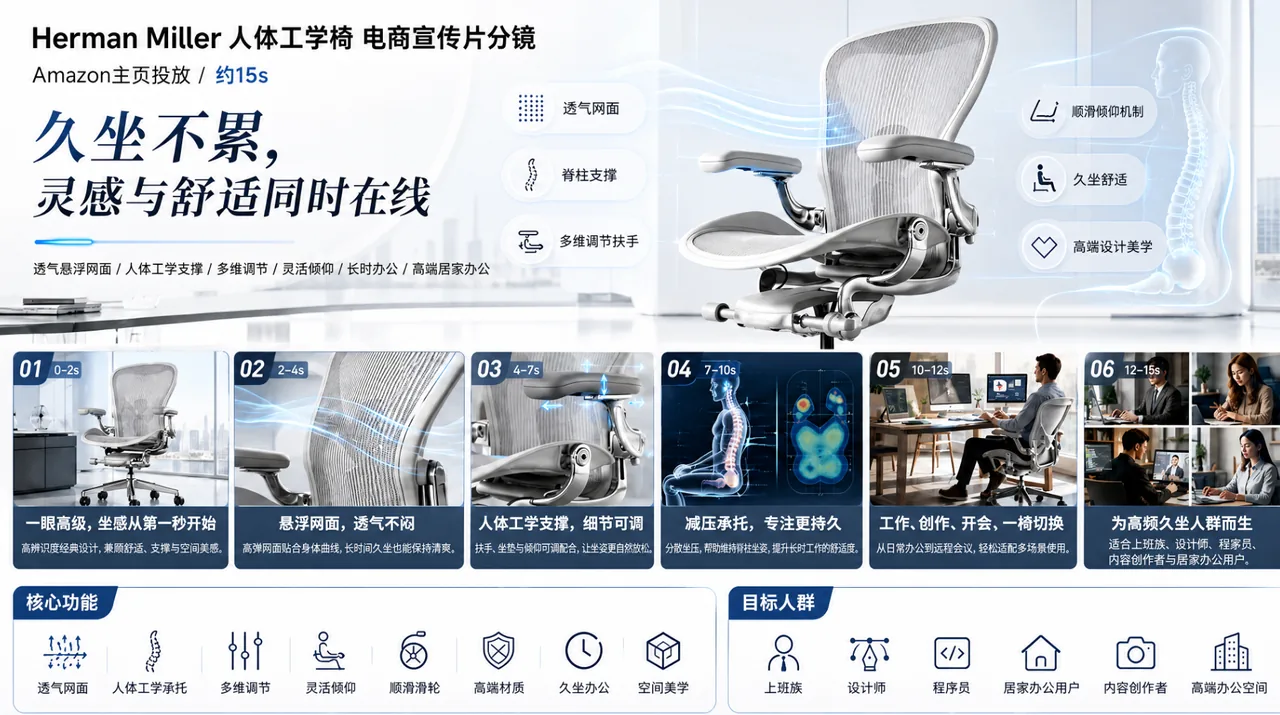
Input image 1 of 2 supplied to this generation
Prompt
Product Feature Visualization

Present a black Herman Miller ergonomic chair in a premium office with a full 360-degree product reveal. Cut to macro views of the breathable mesh back with airflow visualization, an engineering animation of the lumbar support and ergonomic curve, and demonstrations of multidirectional armrest and seat-height adjustment. Show designers, developers, and creative professionals working comfortably over long sessions. Include a 3D skeletal-support visualization that communicates all-day comfort, plus refined interior styling. End with the line: “WHERE INSPIRATION MEETS COMFORT.” Keep the direction minimal, cool-toned, professional, futuristic, and slow-paced. Use Image 1 for feature details and Image 2 for the product.
Reference to Video · 720×1280
- Description
- A product feature film covering materials, mechanisms and adjustment detail.
- Intended Use
- Furniture and home product pages, feature explainers, and ecommerce campaign creative.
Generation mode: Reference to Video. This clip was not produced from a single product image, so it is not labeled as product image to video.
Rotating Product Page Reveal
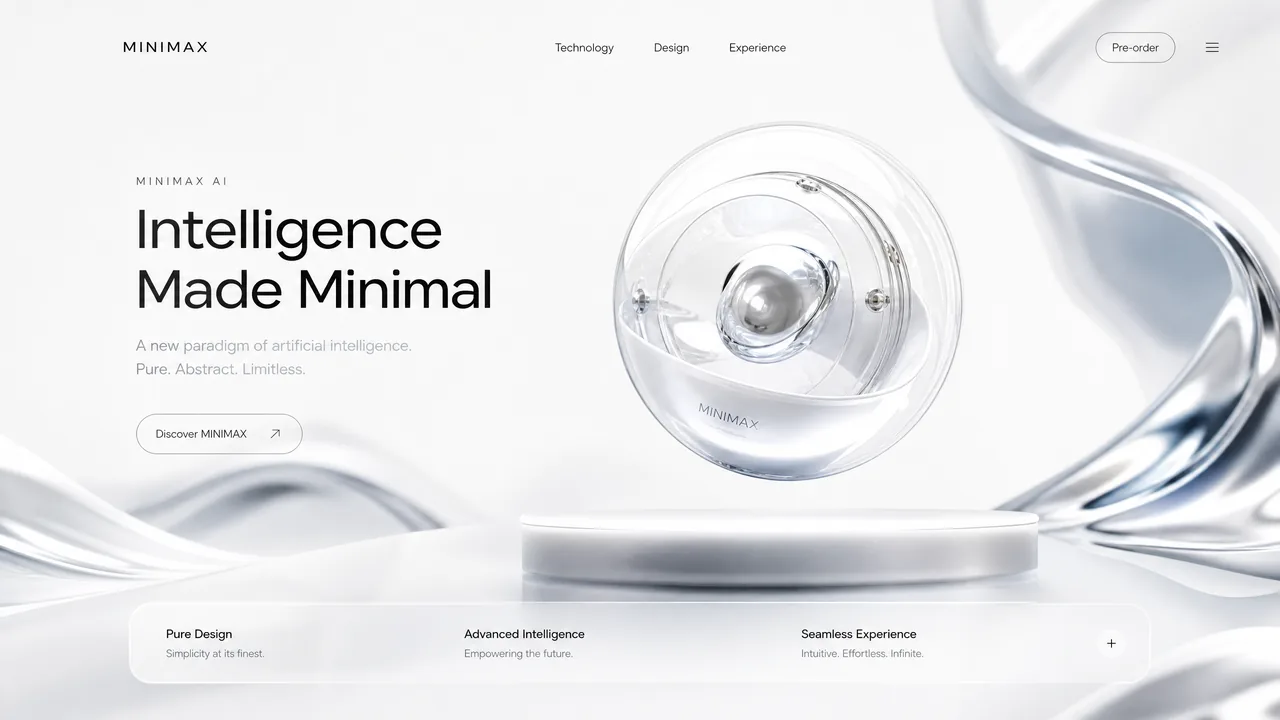
Input image supplied to this generation
Prompt
Reveal the layout from top to bottom. Upper and center typography slides down; lower typography slides up. Once the central product appears, let it rotate subtly.
First & Last Frame · 1280×720
- Description
- A product-page reveal that introduces a product with tightly capped rotation.
- Intended Use
- Product page reveals, launch teasers, and interactive web experiences.
Generation mode: First & Last Frame. This clip was not produced from a single product image, so it is not labeled as product image to video. The generator has no matching tab for this mode, so “Use This Prompt” loads the prompt without switching workflow.
Macro Coffee-to-Fluid Transition
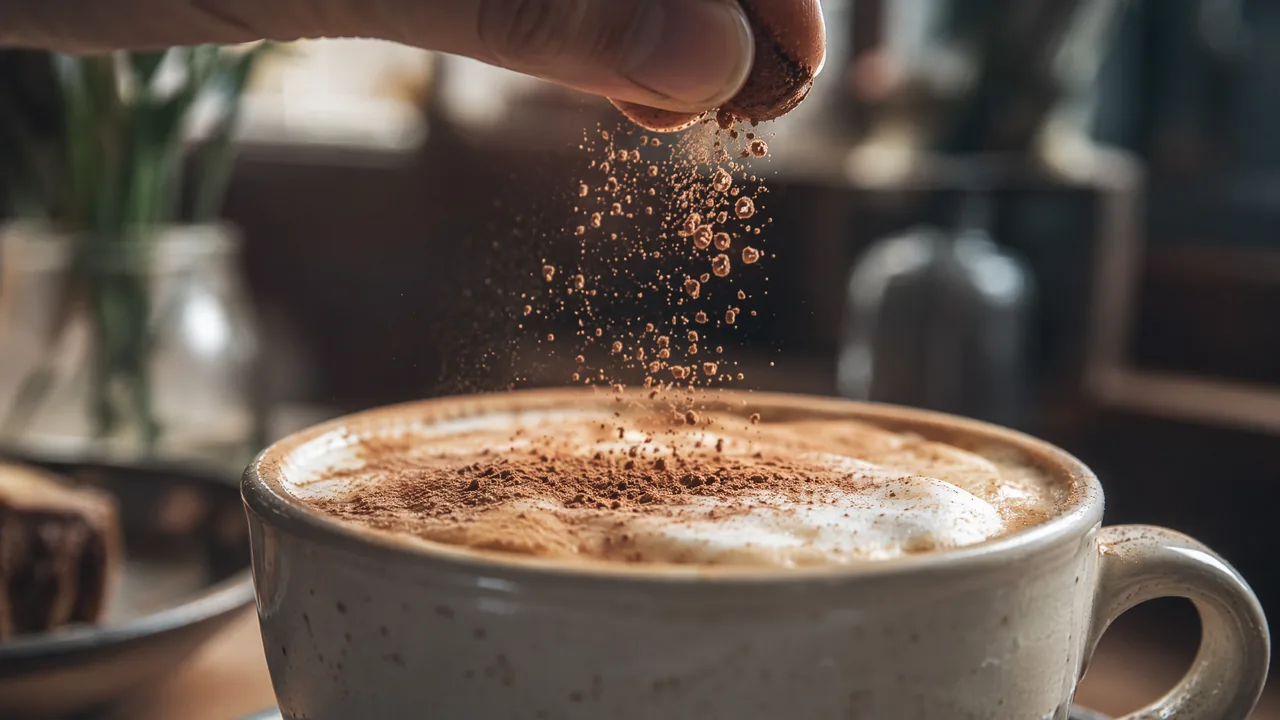
Input image 1 of 2 supplied to this generation
Prompt
@Image 1: Push in rapidly toward the milk foam, cocoa particles, and dark liquid texture on the coffee until particles, bubbles, and ripples fill the frame. Keep the macro photography realistic, with extremely shallow depth of field and fine powder drifting through backlight. Let the surface feel suspended between granular sand and fluid.

At the exact moment when the cocoa particles, foam contours, and coffee swirl closely resemble the dune ridges, wind-carved textures, and airborne sand in @Image 2, transition seamlessly into the desert landscape. Continue pushing forward until the full dunes from @Image 2 are revealed.

No tearing, black frames, hard cuts, obvious VFX, or compositing seams. Keep it photoreal, quiet, and restrained—as though one granular material naturally expands from the microscopic coffee surface into a vast desert. One continuous shot with no visible edit.
Reference to Video · 1280×720
- Description
- Beverage macro detail, surface texture and liquid motion for food and drink brands.
- Intended Use
- Food and beverage advertising, macro product detail, and social creative.
Generation mode: Reference to Video. This clip was not produced from a single product image, so it is not labeled as product image to video.
Product Video Styles You Can Create
Different products need different kinds of motion. Start with one clear visual idea instead of trying to generate an entire campaign in a single clip.
Cinematic Product Reveal
Use a slow push-in, controlled lighting, atmospheric motion, and a clean hero composition to create a premium product introduction.
360°-Style Orbit
Move the camera gradually around the product to reveal shape, material, and surface detail while keeping the product visually central.
Macro Detail Shot
Use a close camera move and shallow depth of field to emphasize materials, texture, buttons, jewelry details, packaging, or craftsmanship.
Light Sweep
Keep the product still and create motion through changing highlights, reflections, rim light, and controlled camera movement.
Lifestyle Product Scene
Place the product inside a believable environment while keeping it as the clear visual focus of the shot.
Social Product Clip
Create a short product-focused shot that can be adapted into vertical social content, ads, launches, and product announcements.
AI Product Videos for Ecommerce
Turn existing product photography into short motion assets for ecommerce product pages, marketplace listings, launches, and promotional campaigns.
Instead of recreating the product from a text description, start from a real product image and use the prompt to control the motion around it.
Use cases
- Product-page videos
- New product launches
- Collection promotions
- Marketplace video assets
- Seasonal campaign visuals
- Paid-social creative
- Short product demonstrations
Can AI product videos be used for Shopify or ecommerce stores?
Yes. Generated product clips can be exported and used as creative assets in ecommerce workflows, provided they meet the store or advertising platform's format and content requirements. MiniMax3 does not claim a native Shopify integration on this page.
Create Product Videos for Ads
AI product video generation is useful when you already have product photography but need motion creative for advertising. Start from the real product image, generate short product shots, review them for accuracy, and combine the usable clips with your approved headline, offer, captions, voiceover, and CTA in your advertising workflow.
Best for
- Product hero shots
- Beauty commercials
- Product reveal clips
- Technology launch visuals
- Fashion campaign footage
- Jewelry close-ups
- Beverage shots
- Social ad B-roll
AI Product Video Generator vs. AI Ad Generator
These tools solve related but different tasks. An AI product video generator focuses on creating the visual product footage. A full AI ad generator may also create scripts, avatars, captions, voiceovers, hooks, and complete ad sequences.
| Feature | AI Product Video Generator | Full AI Ad Generator |
|---|---|---|
| Starting point | Product image / prompt | Product URL / assets / campaign brief |
| Primary output | Product video footage | Complete advertising creative |
| Camera and visual direction | High priority | Varies |
| AI avatars | Usually not required | Often included |
| Automatic scripts | Not the main purpose | Often included |
| Captions / CTA screens | Usually added later | Often generated automatically |
| Best for | Cinematic product footage, ecommerce visuals, hero shots | High-volume UGC and performance-ad production |
MiniMax3 is positioned primarily as a product-video generation workflow. Use it when the product footage itself—camera movement, lighting, scene motion, and visual treatment—is the creative priority.
How to Create an AI Product Video
You can start with a product photo you already have. The main creative decision is not how to describe the product—it is how the shot should move.
- 1
Upload Your Product Image
Choose a clear image where the full product, shape, materials, and important visual details are easy to see. Simple backgrounds usually give the model more room for controlled camera movement.
- 2
Describe the Motion
Focus the prompt on what should happen after the starting image: camera direction, lighting changes, reflections, product motion, background motion, and the desired advertising style.
- 3
Choose Duration and Quality
Use a shorter 768p generation while testing motion and composition. Use 2K when the direction is working and finer product detail or final delivery quality matters.
- 4
Generate and Review
Check the entire clip for product consistency. Inspect labels, logos, small text, shape, colors, materials, reflections, and any moving parts.
- 5
Create Variations
Change one variable at a time. Test a slower camera move, different lighting, a cleaner environment, or another framing choice instead of rewriting the entire prompt.
If you do not have a usable product image yet, MiniMax H3 text to video can start from a written description instead, and you can switch to a product photo once you have one.
How to Write an AI Product Video Prompt
A strong product-video prompt describes the change you want to see over time instead of repeating everything already visible in the image. For a wider set of reusable prompt patterns, see the MiniMax H3 prompts collection and the MiniMax H3 prompt guide.
- Product Lock
- Keep the watch design, materials, colors, and visible details consistent with the reference image.
- Camera Motion
- Slow macro push-in followed by a subtle clockwise orbit.
- Environmental Motion
- Fine atmospheric haze moves slowly in the background.
- Lighting
- Warm rim light travels across the polished metal.
- Commercial Style
- Luxury watch campaign, cinematic realism.
Full example
Keep the watch design, materials, colors, and visible details consistent with the reference image. The camera performs a slow macro push-in followed by a subtle clockwise orbit. Fine atmospheric haze moves slowly in the background while warm rim light travels across the polished metal. Luxury watch campaign, cinematic realism.
How to Keep the Product More Consistent
Product accuracy matters more than spectacular motion when the video represents a real item for sale. Generative video can introduce changes to packaging, typography, geometry, reflections, materials, or small details, so the source image and prompt should reduce unnecessary variation.
Do
- Start with a sharp product image
- Keep the product fully visible
- Use one clear camera movement
- Put motion into the camera, lighting, and environment
- Explicitly protect important visible details
- Review every frame before publishing
Avoid
- Asking the product to transform unnecessarily
- Combining several complex actions
- Using tiny packaging text as the main success criterion
- Adding unrelated objects around the product
- Assuming a generated result is accurate without review
If exact labels, dimensions, regulated claims, or packaging details are commercially important, verify the generated output against the real product before using it in advertising.
768p or 2K for Product Videos?
Use 768p to test the shot. Move to 2K after the motion and composition are working.
| Use Case | Recommended Starting Point |
|---|---|
| Prompt testing | 768p |
| Camera-motion testing | 768p |
| Social draft | 768p |
| Product close-up | 2K |
| Fine material detail | 2K |
| Final campaign asset | 2K |
| Cropping or reframing | 2K |
Higher resolution does not automatically fix product drift, motion problems, or poor prompt direction.
What Products Work Well With AI Product Video?
Product-video workflows work especially well when the product has a clear silhouette, recognizable materials, and enough visual space for controlled camera movement.
Beauty & Skincare
Perfume bottles, cosmetics, skincare packaging, serums, and premium beauty products work well with slow reveals, reflections, mist, and macro lighting.
Jewelry & Watches
Use macro camera moves, light sweeps, reflections, and controlled orbits to emphasize metal, stones, dials, and craftsmanship.
Fashion & Accessories
Shoes, handbags, eyewear, and accessories can use editorial camera slides, subtle rotations, lifestyle settings, and material-focused close-ups.
Electronics
Headphones, speakers, phones, gadgets, and consumer electronics work well with minimalist backgrounds, clean rotations, and modern studio lighting.
Food & Beverage
Use controlled movement, condensation, steam, splashes, ingredients, and close-up texture while keeping packaging visually central.
Home & Lifestyle
Furniture, décor, appliances, and lifestyle products can be placed in realistic environments with slow camera reveals and natural lighting changes.
AI Product Video Generator FAQ
What is an AI product video generator?
An AI product video generator uses generative AI to turn product images, prompts, or other product assets into video. The generated footage can include camera movement, lighting changes, environmental motion, product reveals, and commercial-style visual treatments.
Can I turn one product photo into a video?
Yes. A single product photo can be used as the first frame of an image-to-video generation. The photo establishes the product and composition, while the prompt describes how the camera, lighting, environment, or product should move.
How do I turn a product image into a video with AI?
Upload a clear product image, describe the motion you want, choose the available duration and quality settings, and generate the video. For image-to-video, focus the prompt on movement rather than repeatedly describing what is already visible in the image.
Can AI create a product commercial without filming?
AI can generate short commercial-style product shots without a traditional video shoot. You can create product reveals, camera orbits, close-ups, lifestyle scenes, and other footage from an existing product image. A finished campaign may still require editing, approved copy, captions, voiceover, or an end card.
What image works best for an AI product video?
Use a sharp, well-lit image where the product is clearly visible and separated from the background. Leave enough space around the product for camera movement, and avoid relying on very small text or partially hidden product details.
Can I create ecommerce product videos with AI?
Yes. AI-generated product clips can be used as creative assets for product pages, ecommerce campaigns, product launches, marketplace listings, and social content. Review the generated product carefully before publishing it commercially.
Can I make product ads from photos?
Yes. Product photos can be used to generate short advertising footage such as hero shots, reveals, close-ups, lifestyle scenes, and cinematic product clips. Add approved marketing claims, captions, pricing, and calls to action separately when required.
Can I generate product videos for TikTok or Instagram?
Yes. Short product videos can be generated for vertical social formats and then used in TikTok-style videos, Instagram Reels, Shorts, and other social campaigns. A 9:16 source generation usually gives more usable framing than cropping a wide video afterward.
How long can MiniMax H3 product videos be?
Supported MiniMax H3 image-to-video workflows on MiniMax3 currently offer short video durations from 4 to 15 seconds. Available settings may vary by generation mode, quality, or provider.
Does MiniMax H3 support 2K product videos?
MiniMax H3 supports 768p and 2K output on supported MiniMax3 workflows. Use 768p for prompt and motion testing, then consider 2K when fine product details or final delivery quality matter.
Does MiniMax H3 generate audio with product videos?
MiniMax H3 supports native audiovisual generation in compatible workflows. Audio availability can depend on the generation mode and provider, so the generator interface should be treated as the current source of truth.
What camera movements work well for product videos?
Slow push-ins, subtle orbits, lateral slides, macro passes, controlled rotations, and small dolly movements work well because they add visual interest without requiring the product itself to perform complex motion.
How can I keep my product consistent in an AI video?
Start with a clear source image and explicitly ask the model to keep important visible characteristics consistent. Reduce unnecessary product movement and put most of the motion into the camera, lighting, reflections, environment, or background.
Will logos and packaging always stay accurate?
No. Generative video can distort small text, logos, packaging, or fine product details. Use a high-quality source image, keep the motion controlled, and review the entire result before publishing or using the video in advertising.
Can I create cinematic product videos with AI?
Yes. Product images can be turned into cinematic-style shots using controlled camera movement, lighting, reflections, atmospheric effects, depth of field, and commercial visual direction.
Do I need video editing experience?
No editing experience is required to generate a basic product clip. You upload an image, describe the shot, and generate the result. More complex ads may still benefit from conventional editing for captions, music, voiceover, claims, offers, or multiple scenes.
Should I use 768p or 2K?
Start with 768p when testing prompts, camera movement, and composition. Once the shot direction works, use 2K when finer product detail or higher-resolution delivery is important.
Can I use the same product image with different prompts?
Yes. Reusing the same source image with different motion, lighting, framing, and environmental prompts is a useful way to create multiple creative directions while keeping the original product reference consistent.
Turn Your Product Photo Into a Video
Start with one product image. Add the camera movement, lighting, and commercial style you want, then generate a short AI product video with MiniMax H3.
Generate → review product accuracy → refine the prompt → export the version that works.
About this tool
MiniMax3.org is an independent AI video platform that provides supported MiniMax H3 generation workflows, examples, prompts, and practical resources. MiniMax3.org is not the official MiniMax company website.
MiniMax H3 is developed by MiniMax.
About the author
Jaysean Brambila is the founder of MiniMax3.org, where he works on practical AI video generation workflows, prompt engineering, multimodal video tools, and creator-focused MiniMax H3 resources.
Product Videos for Social Media
Create short product-focused footage that can be adapted for TikTok, Instagram Reels, YouTube Shorts, Facebook, and other social formats.
For social content, keep the product visible early, use one clear visual hook, and generate in the aspect ratio closest to the final placement whenever possible.